
Nodes and scenes
In GDScript, a wrong $Sprite2D path only fails when the game runs. Here this.get_node('Sprite2D') is typed from your .tscn files: the editor completes the path, and the result has the node’s real type.
Nodes from your scene
Section titled “Nodes from your scene”Say player.tscn looks like this, with the script converted from src/player.ts attached to the root node:
Player (CharacterBody2D) ← scripts/player.gd├── Sprite2D├── CollisionShape2D└── HealthBar (ProgressBar) ← unique name (%HealthBar)Inside Player, TypeScript knows that tree:
export class Player extends CharacterBody2D {  @onready sprite: Sprite2D = this.get_node('Sprite2D');  @onready health_bar: ProgressBar = this.get_node('%HealthBar');
take_hit(damage: int) { this.health_bar.value -= damage; this.sprite.modulate = Color.RED; }}class_name Playerextends CharacterBody2D
@onreadyvar sprite: Sprite2D = self.get_node("Sprite2D")@onreadyvar health_bar: ProgressBar = self.get_node("%HealthBar")
func take_hit(damage: int): self.health_bar.value -= damage self.sprite.modulate = Color.RED@onready works as in GDScript: the node is looked up just before _ready(). A %UniqueName path works from any node in the scene, and so do absolute /root/... paths. The output spells the lookup self.get_node("Sprite2D") rather than $Sprite2D; in Godot the two are the same call.
The editor suggests every path in the scene as you type:
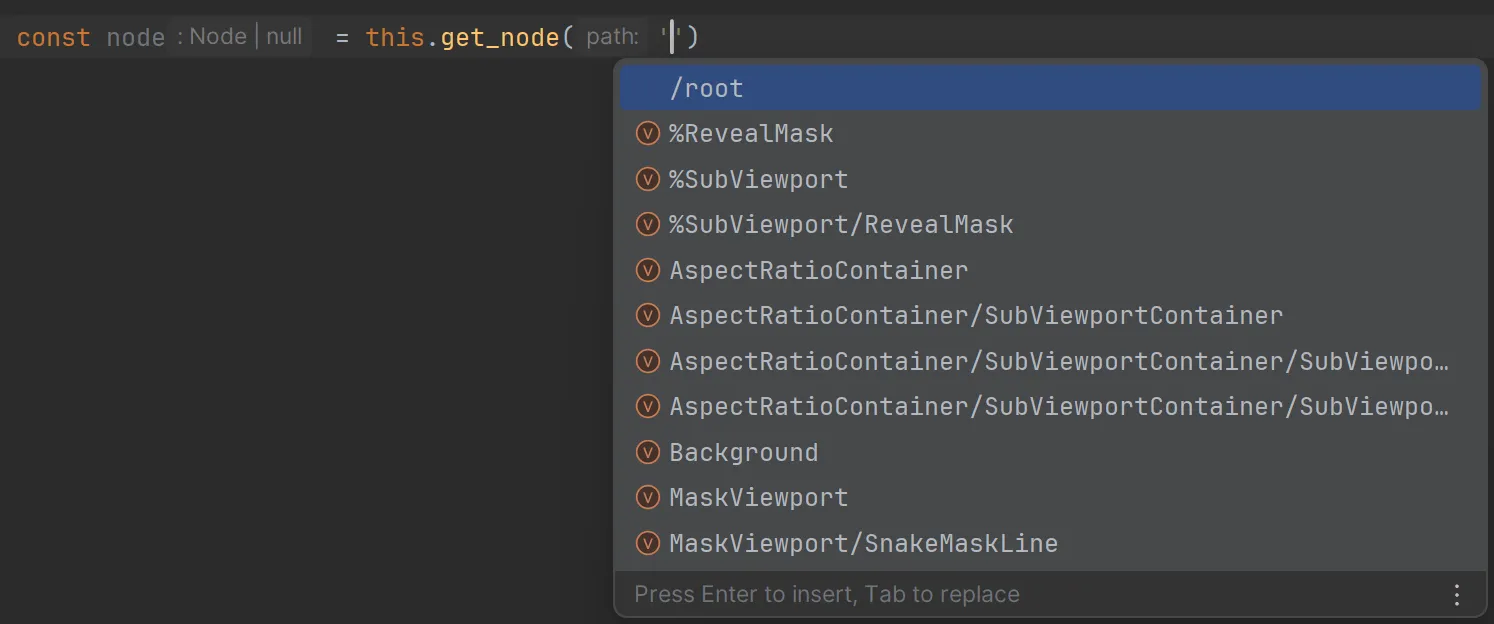
A path that isn’t in the scene gives Node | null, so a typo shows up as a type error on the line that uses it. get_node_or_null() works the same way and adds | null. get_parent() and get_child(index) are typed from the scene too.
Nodes without a scene
Section titled “Nodes without a scene”When TypeScript can’t know the node (the script isn’t attached in any scene, or the path is built at runtime), get_node() returns Node | null. Check the type yourself, with gd.as or instanceof:
export class Hud extends CanvasLayer {  @onready score_label = gd.as(this.get_node('Score'), Label);
set_score(score: int) { if (this.score_label !== null) { this.score_label.text = str(score); } }}class_name Hudextends CanvasLayer
@onreadyvar score_label = self.get_node("Score") as Label
func set_score(score: int): if self.score_label != null: self.score_label.text = str(score)Loading scenes and resources
Section titled “Loading scenes and resources”load() and preload() know every file in your project. A .tscn path gives a PackedScene whose instantiate() returns the scene’s root node, with its script class if it has one:
export class Spawner extends Node2D {  bullet_scene = preload('res://scenes/bullet.tscn');
  fire() {    let bullet = this.bullet_scene.instantiate();    bullet.position = this.global_position;    this.add_child(bullet);  }}
The editor completes res:// paths and shows the type each one loads:
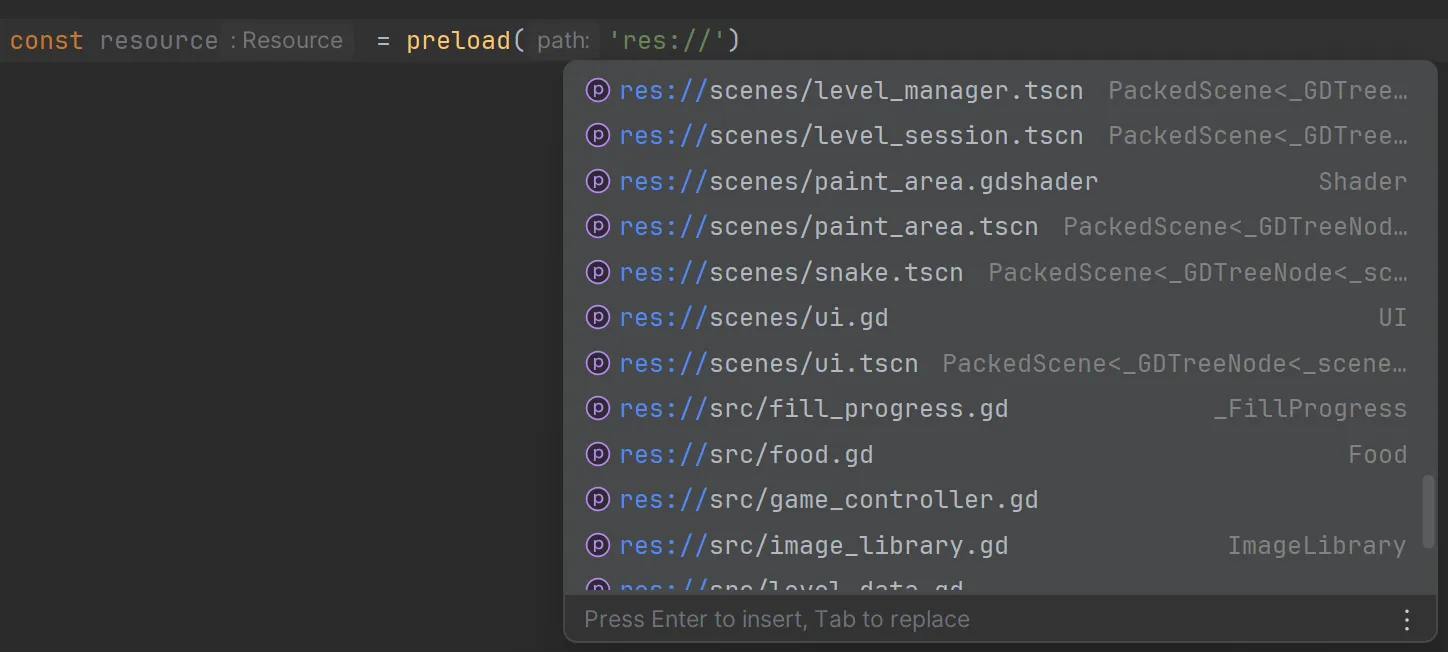
A path that doesn’t exist still compiles and gives a plain Resource. Paths can also be uid://…, and resolve to the same type.
Groups
Section titled “Groups”get_tree().get_nodes_in_group('enemies') returns an array typed with the nodes you put in that group in your scenes. A group that no scene uses gives plain Nodes. call_group, add_to_group and is_in_group take any string, as in GDScript.
export class Referee extends Node { end_round() { for (let enemy of this.get_tree().get_nodes_in_group('enemies')) { enemy.queue_free(); } this.get_tree().call_group('players', 'celebrate'); }}Autoloads from project.godot are typed globals too: an autoloaded script is its class, and an autoloaded scene is its root node, with get_node() into its tree.
Project names as types
Section titled “Project names as types”A few global types list what exists in your project, so your own functions can take only real names:
GodotResourceName: anyres://file.GodotSceneName: any.tscnfile.GodotScriptName: any.gdscript.GodotGroupName: any group used in a scene.
export class AssetLoader extends Node {  load_asset(path: GodotResourceName) {    return load(path);  }
  count_in_group(group: GodotGroupName): int {    return this.get_tree().get_nodes_in_group(group).size();  }}
this.load_asset('res://does_not_exist.png') is then an error. The interfaces behind them (GodotResources, GodotScenes, GodotScripts, GodotGroups) map each name to its type, e.g. GodotScenes['res://player.tscn'] is the scene’s root node type.
Keeping the typings current
Section titled “Keeping the typings current”tstogd convert and tstogd watch regenerate these typings, and watch updates them as soon as you save a scene in Godot; see How it works.
Details
Section titled “Details”See scene typings, the project name types and tstogd generate-typings in the reference.